
the blog

insights

A blur Green Ball

How to Scale a Large Amazon Catalog Without Multiplying Creative Costs

How to Scale a Large Amazon Catalog Without Multiplying Creative Costs

How to Scale a Large Amazon Catalog Without Multiplying Creative Costs

A strategic guide for Amazon brands whose catalogs have outgrown their content strategy.

TL;DR

  • Most large Amazon catalogs are unoptimized for one of two reasons: the brand thinks reviews and recognition are enough, or the per-product cost of optimization is too high to scale.
  • Per-product optimization costs $420–$620 at minimum freelancer rates and $800–$3,000+ at agency rates. For catalogs with 50–200 products, that math doesn’t work.
  • The solution is a system-based approach: build the content architecture once per product family, then adapt it across the catalog at a fraction of the per-product cost.
  • Three content approaches (Specific, Mix, Generic) give you flexibility based on budget. We always recommend Specific for the best conversion results. Mix is the practical middle ground when budget is tight.

The Dilemma Most Large-Catalog Brands Are Sitting On

There is a pattern we see constantly with brands that have grown to 50, 100, or 200+ products on Amazon. Their catalogs are large. Their content is not optimized. And in most cases, one of two things is keeping it that way.

Reason 1: They believe they don’t need to optimize

These are brands that already have momentum. They’ve built a strong brand name in their market. They have thousands of reviews. Their ratings are solid. Shoppers find them through brand name searches or buy on review count alone.

Because the products sell, the content gets neglected. The listing images are basic, product shots taken on a phone, maybe a few factory photos. The A+ Content is generic, a couple of brand-level modules copied across the catalog, maybe a banner with a logo. The bullet points are thin or filled with specs that don’t sell. The product descriptions are either empty or boilerplate. The Brand Story is either missing or irrelevant.

What you don’t see: infographic images that highlight features and benefits. Lifestyle images that show the product in use. Comparison charts that help shoppers choose between variants. Process or quality images that build trust. Benefit-driven copy that handles objections.

These brands are leaving conversion on the table and don’t know it, because the reviews and brand recognition are masking the gap. But every percentage point of conversion lost is compounding across every listing, every day. On a catalog with 100 products, even a small per-listing conversion improvement adds up to significant revenue.

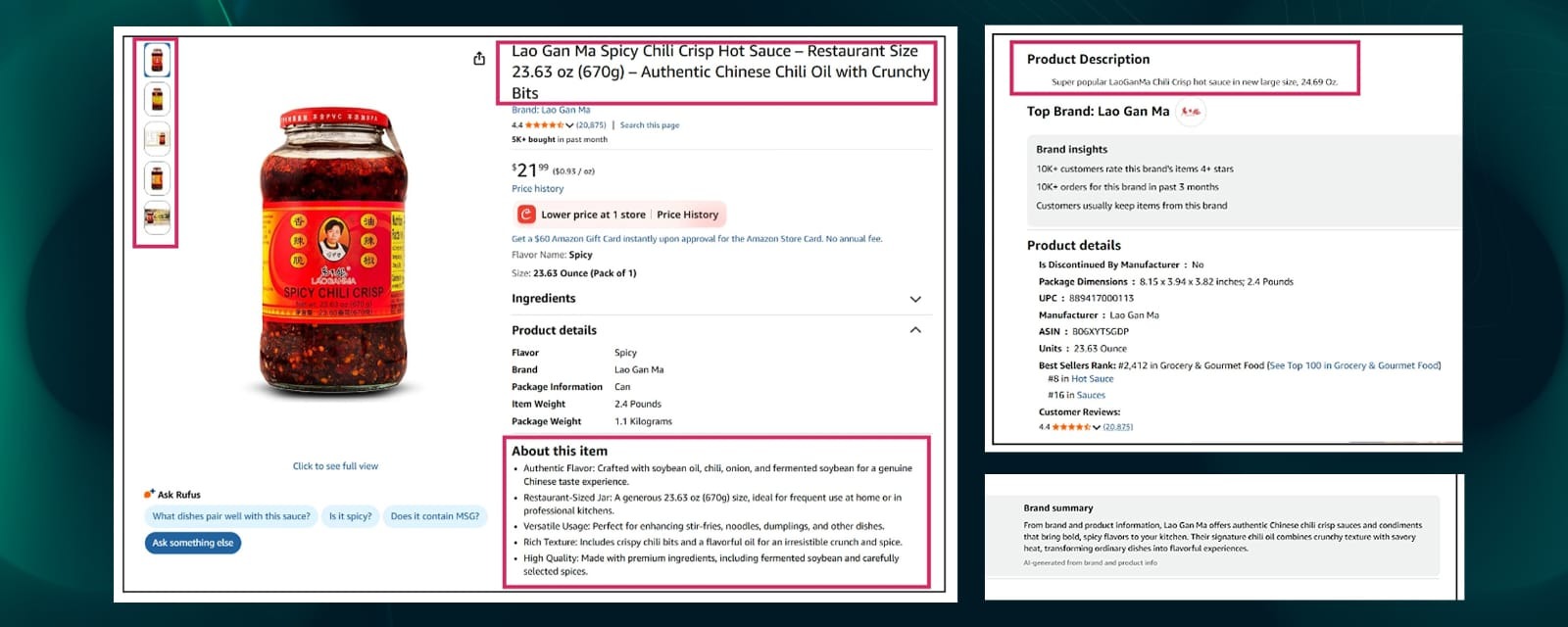
Example: Lao Gan Ma, 20,000+ reviews, 4.4-star rating, BSR #8 in Hot Sauce, 5K+ units/month. But the listing has basic bottle shots, no infographics, no lifestyle images, thin bullet points, a one-line product description, and zero A+ Content. Brand momentum is carrying it. The content is doing nothing.
klliouio

Reason 2: They know they need to optimize, but the cost is prohibitive

This is the math problem. Even at the lowest end of the market, optimizing a single product properly takes real hours:

  • Listing images (7–8 images including infographics, lifestyle, comparison): 8–12 hours of design work. At $20/hour, that’s $160–$240 per product.
  • A+ Content (standard modules with brand storytelling and proof): 10–14 hours. At $20/hour, that’s $200–$280 per product.
  • Listing copywriting (title, bullet points, description, backend keywords): 3–5 hours. At $20/hour, that’s $60–$100 per product.

That’s $420–$620 per product at minimum rates, the floor, not the average. And that’s just images, A+, and copy. It doesn’t include Brand Story, storefront design, or variation-specific adaptations.

Scale that to 50 products: $21,000–$31,000 at minimum rates.

Scale to 200 products: $84,000–$124,000.

And those are freelancer rates. If you go to a mid-tier agency, listing images run $400–$600 per product. Standard A+ Content runs $400–$800. Premium A+ Content runs $1,200–$2,000+. A single product’s creative package easily costs $800–$1,500 through an agency, and premium agencies charge $1,500–$3,000+ per product.

At those rates, optimizing 50 products costs $40,000–$75,000. A 200-product catalog? Six figures.

So the brand sits on an unoptimized catalog. Not because they don’t care, but because the economics of per-product optimization don’t scale.

What Unoptimized Content Actually Costs You (Beyond Lost Sales)

The brands we described above, the ones coasting on reviews or stuck on cost, aren’t just leaving money on the table. They’re compounding the loss every month across every listing.

The math works like this.

Amazon’s platform-wide average conversion rate sits around 10%. In categories like beauty, grocery, and consumables, well-performing listings convert at 15–25%. Even in competitive categories where averages run lower, the gap between an unoptimized listing and a properly optimized one is typically several percentage points, and on Amazon, those points compound across every listing, every day.

That gap matters more than most brands realize. Take a product doing $50,000/month in revenue at a 10% conversion rate. A 5-point conversion lift, from 10% to 15%, doesn’t add 5% more revenue. It adds 50% more revenue from the same traffic. That’s $25,000/month in additional sales from one listing, with zero increase in ad spend.

Now multiply that across 50 listings. Or 100.

And that’s just the direct conversion impact. There are three other effects that compound on top of it:

  • Lower ACoS on PPC. When your listing converts better, every click from paid ads is worth more. Brands routinely see ACoS drop by 15–30% after content optimization, not because they changed their ad strategy, but because the listing started closing more of the traffic it was already getting.
  • Better organic ranking. Amazon’s A10 algorithm uses conversion rate and sales velocity as ranking signals. A listing that converts higher sells more units, which pushes it up in organic search, which brings more free traffic, which drives more sales. It’s a flywheel, and unoptimized content is the brake.
  • Higher perceived value. This one’s harder to measure but easy to see. A listing with professional infographics, lifestyle imagery, and structured A+ Content looks like a premium product. A listing with phone photos and a one-line description looks like a commodity, even if the product is identical. That perception gap affects not just conversion but also price elasticity. Brands with strong content can hold higher prices without losing the sale.

That’s the real cost of sitting on an unoptimized catalog. It’s not a one-time loss. It’s a daily leak that multiplies across every product, every month, with no ceiling.

The rest of this guide is about how to stop that leak without spending six figures on per-product creative.

If you want this applied to your catalog, book a strategy call and we’ll include a free catalog audit as the next step.

Okay, Got you, But what’s the solution?

The reason catalog optimization is so expensive is that the industry treats every product as a standalone project. New strategy, new design direction, new copy brief, new revision cycle, for every single SKU. That’s why the math breaks at 50+ products.

The alternative is to stop treating the SKU as the unit of work and start treating the system as the unit of work.

That means instead of designing 80 listings individually, you build a content architecture around product families, groups of products that share enough in common (audience, use case, brand story, proof elements) to benefit from a unified content framework. You design that framework once. Then you adapt it across every product in the family, changing only what needs to change per listing.

The structural decisions, where the USP goes, how the benefit story flows, what proof elements sit above the fold, how the A+ modules are sequenced, get made once per family. Every listing after that is an adaptation, not a new build. That’s where the 30–60% cost reduction comes from: you’re not paying for strategy and structure on every product. You’re paying for it once, then paying only for the adaptation.

But before any of that works, you need to answer two questions:

  1.     What type of catalog do you have? A catalog of mostly unique/standalone products breaks differently than a catalog with heavy variation counts (colors, sizes, scents). The optimization approach depends on which one you’re dealing with, or if it’s both.
  2.     How do you want to handle variation-level content? There are three approaches with different cost levels. The right choice depends on your budget and how much visual precision you want per variant.

The next sections cover both.

First: Figure Out What Type of Catalog You Have

Before choosing a content strategy, you need to know what kind of optimization problem you’re solving. Not all large catalogs break the same way.

If your catalog is mostly unique/standalone products

Your problem is consistency across unrelated products. A face cream, a body wash, a hair mask, and a lip balm are separate products with different selling points, different buyer objections, and different keyword targets.

The approach: Product Family Grouping. Organize products into logical families (facial care, body care, hair care). Build a shared content architecture per family, Brand Story, proof modules, comparison logic, storefront structure stay consistent within the family. Individual listings get tailored copy and imagery, but the structural backbone is shared.

This is where the biggest cost savings come from: you stop rebuilding the brand story and proof framework from scratch for every product.

If your catalog has heavy variation counts (colors, sizes, scents, materials)

Your problem is variant accuracy vs. cost control. You have core products that come in multiple colors, sizes, scents, or materials. The product experience is the same, what changes is the visual presentation.

The approach: Three content strategies (Specific, Generic, or Mix) that handle variation-level content differently. We cover all three in the next section. The decision between them is primarily a budget decision.

If your catalog has both (most real catalogs do)

Use both approaches in parallel. Map your catalog into product families first (Grouping). Then for products with meaningful variations, apply one of the three content strategies to handle the variant-level content.

Example: A skincare brand has 60 listings across 5 product families. Within “body care,” their body butter comes in 8 scent variants, they choose a content strategy (Specific, Mix, or Generic) for how to handle those variants. Their hero face serum has 3 formulations for different skin types, same decision. The family-level Brand Story and proof architecture stays consistent across all of them regardless of which variant strategy they choose.

Quick test: list every parent ASIN and count how many have 5+ child variations. That ratio tells you how much of your optimization challenge is about grouping vs. variant handling.

Three Ways to Handle Variation-Level Content: Specific, Generic, and Mix

When your catalog includes products with multiple variations, colors, sizes, scents, materials, flavors, the question isn’t just “should we optimize?” It’s “how do we handle the variations?”

Every variation a shopper clicks needs to make sense visually. If someone selects “Lavender” and sees product images in “Eucalyptus,” that’s confusion. Confusion kills conversion. The question is how far you go in customizing content per variation, and that’s primarily a budget decision.

There are three structured approaches. We recommend Specific for every catalog we work on. When budget requires a trade-off, Mix is where most brands land. Generic exists as an option but should be understood as a compromise.

The Specific Approach (Recommended)

Every variation gets its own listing images and A+ Content, fully designed in its respective color, material, scent, or formulation. When a shopper switches from “Rose Gold” to “Matte Black,” the entire visual experience shifts to match, product shots, infographics, lifestyle images, A+ modules, everything.

This is the approach we recommend by default:

  • Buyers understand the product faster. When every image matches the selected variant, there’s no mental translation required. The shopper sees exactly what they’re buying. That reduces hesitation and speeds up the purchase decision.
  • It converts better. A shopper looking at a blue yoga mat wants to see blue yoga mat lifestyle images, blue yoga mat infographics, and blue yoga mat A+ Content, not a generic set of images that show all five colors together. The visual specificity builds confidence.
  • It handles material/formulation differences properly. If your product comes in different materials (cotton vs. linen vs. silk) or formulations (sensitive skin vs. oily skin vs. anti-aging), each variant has different selling points, textures, and use cases. Specific lets you highlight what matters for each variant individually.
  • It looks premium. A listing where every variant has its own tailored visual experience signals quality and attention to detail.

The Generic Approach (Budget Option)

One master content system incorporates all variations within the same visual framework. All colors, sizes, or materials appear together in the listing images and A+ modules. Only the main hero image (the white-background product shot) reflects the selected variant.

Cost: This is the lowest-cost approach because you’re building one set of content for the entire product family. No per-variant adaptation.

The trade-off is real: when a shopper selects “Green” and the infographics show the product in red, and the lifestyle image shows someone using the blue version, there’s a disconnect. For categories where color/material is cosmetic and doesn’t change the buying decision (phone cases, basic accessories), this friction is minimal. For categories where the variation matters to the purchase decision (skincare formulations, fabric materials, flavored products), the friction costs conversion.

Generic works when the budget is tight and variation differences are primarily cosmetic. But understand what you’re trading: lower cost in exchange for a less precise buyer experience.

The Mix Approach (Best Balance When Budget Is Tight)

Listing images follow the Specific approach, each variant gets its own visually aligned product shots and infographics above the fold. A+ Content follows a unified approach, one layout shared across all variants.

This works because listing images and A+ Content serve different roles. Listing images are the first thing shoppers see. They drive the click, build the first impression, and visual accuracy there directly affects whether the shopper stays or bounces. A+ Content sits below the fold. By the time a shopper scrolls there, they’ve already seen the product in their selected variant. A+ functions as brand storytelling and feature reinforcement, less sensitive to per-variant color matching.

Cost: 20–25% more than Generic, 25–35% less than fully Specific. This is where most brands land when they want strong visual accuracy but need to keep total project cost manageable. It’s the most popular choice among brands we work with when full Specific isn’t in the budget.

How to Decide Which Approach to Use

This is a budget decision, not a product importance ranking.

We recommend Specific for every catalog. It produces the best conversion rates, the clearest buyer experience, and the most professional presentation. If your budget supports it, that’s the approach to take.

If your budget doesn’t stretch to Specific across the full catalog, Mix is the practical middle ground. You get visual accuracy where it matters most (listing images above the fold) while managing cost on the A+ Content below.

Generic is available for brands operating on tight margins who need their entire catalog covered at the lowest possible cost. It works, but it compromises the buyer experience in ways that Specific and Mix don’t.

The cost comparison for a product with 12 color variations:

 SpecificMixGeneric
Listing images12 variant-specific sets12 variant-specific sets1 unified set (all colors shown)
A+ Content12 variant-specific layouts1 unified layout1 unified layout
Buyer experienceFull visual match per variantMatch above fold, unified belowMain image only matches variant
Relative costHighest25–35% less than Specific30–40% less than Specific
Our recommendation✓ Default recommendationBest alternative when Specific isn’t feasibleOnly when budget requires it

Every product in your catalog deserves the best content you can afford. The approach determines how far that budget stretches.

Book a free catalog audit and we’ll map it out for you.

Product Family Architecture™: How to Group Before You Design

Product Family Architecture is the practice of organizing your catalog into logical families based on shared characteristics, audience overlap, and content requirements. Instead of looking at 80 individual products, you identify 5–7 families that share enough DNA to benefit from a unified content system.

Example: A skincare brand with 60 listings organizes into facial care, body care, treatment masks, and hair care. Within each family, products share similar use cases, storytelling needs, and proof elements, even though formulations differ.

This step determines what content gets built once per family (Brand Story, quality proof, comparison logic, storefront structure) and what gets customized per product (product-specific copy, variant imagery, keyword targeting).

What Stays Consistent Within a Family

Brand Story narrative, quality proof and certifications, manufacturing story, ingredient philosophy, “how to choose” logic, cross-sell structure, storefront navigation. Build this once per family. It applies across every product in that family.

What Gets Customized Per Product

Product-specific copy (title, bullet points, description, backend keywords), product-specific imagery, USP emphasis, benefit hierarchy, and, if the product has variations, the variant-level content handled by whichever approach (Specific, Mix, or Generic) the brand chose.

The grouping is what makes the system affordable. The customization per product is what keeps it from feeling generic.

How to Maintain Visual Consistency Across 100+ Listings Without Rebuilding Every Image From Scratch

A Master Layout is a structural content framework built for a specific product family. It defines where headlines go, where proof elements sit, where lifestyle images appear, what the infographic structure looks like, and how A+ modules flow, all based on how buyers in that category actually make decisions.

It locks in the structure (the expensive, strategic part) and leaves the content (product-specific details) open for adaptation. Once the structure is built for a product family, adapting it for a new SKU means updating the product image, copy, specs, and color accents, not starting over.

Why This Changes the Cost Equation

Without a layout system, every new listing is a blank canvas. The designer makes new structural decisions every time: where to place the USP, how to sequence the benefit story, what proof goes above the fold. Those structural decisions are where the real time and money go, not the photo swaps.

A Master Layout makes those decisions once per product family. Every listing after that is an adaptation, not a new build. That’s why the per-product cost drops dramatically after the system is in place.

What This Looks Like in Practice

A brand has three product lines: facial serums, body lotions, and hair treatments. Each sells to a different buyer with different objections.

  • Facial serums: Buyers want ingredients and clinical proof. The layout leads with ingredient callouts above the fold, followed by before/after proof modules in A+.
  • Body lotions: Buyers want texture and scent. The layout leads with lifestyle application imagery, followed by scent/texture comparison modules.
  • Hair treatments: Buyers want results and compatibility. The layout leads with before/after imagery, followed by a “which product is right for your hair type” decision module.

Three different content frameworks. Three different conversion strategies. But all three share the same brand typography, color system, proof formatting, and storefront navigation. The catalog feels like one brand, not three disconnected projects.

When SKU #45 launches in the body lotion line, the designer adapts the body lotion framework. Structural decisions are already made. That’s why adaptation takes a fraction of the time and cost of a fresh build.

Who Should Do the Work: In-House, Freelancers, or an Agency?

Once you decide your catalog needs optimization, the next question is who handles it. Each option has real trade-offs.

Option 1: Hire an In-House Designer (or Two)

The instinct makes sense: bring someone in full-time, give them the catalog, let them work through it.

Where it breaks down in practice:

  • Onboarding takes time. Finding the right person, interviewing, hiring, getting them set up with your brand guidelines, Amazon requirements, and design tools, that’s weeks before any content gets produced.
  • A full-time designer on a fixed salary works at a fixed pace. If your catalog has 100+ products, you’re looking at months of work from a single person. You can’t speed it up without hiring more people.
  • You become the creative director. Someone has to give direction on every product family, review every deliverable, maintain consistency. If you hire two designers, you also need to keep their output aligned, same visual language, same brand standards, same quality level. That’s a management job on top of everything else.
  • Revision cycles eat time. Every listing goes through feedback rounds. Multiply that by 50–200 products and supervision alone becomes a part-time job.

In-house works if you already have a creative director, documented brand guidelines, and enough volume to keep the team utilized year-round. For a one-time catalog overhaul, the overhead usually outweighs the output.

Option 2: Outsource to Freelancers

Freelancers charge per project. A listing images project might run $150–$400. An A+ Content project runs $200–$500. That’s $350–$900 per product at moderate freelancer rates.

The problems:

  • At $350–$900 per product, a 50-product catalog still costs $17,500–$45,000. Every SKU is a separate project.
  • You still need to supervise. Freelancers execute, but they rarely strategize. You’re giving direction on every product, managing revisions, ensuring the output matches your brand.
  • Consistency suffers. If you use multiple freelancers to move faster, each one interprets your brand differently. The catalog ends up looking like it was built by five different people, because it was.
  • No system carries over. When product #51 launches, you’re back to square one, new brief, new project, full cost again.

Option 3: Hire a Photography Agency

Agencies bring process and expertise, but the cost structure scales the problem instead of solving it.

  • Most agencies charge $400–$600 for listing images and $400–$800 for standard A+ Content per product. That’s $800–$1,400 per product at the mid-range. Premium A+ runs $1,200–$2,000+.
  • For 50 products: $40,000–70,000+. For 200 products: six figures.
  • Many agencies add variation surcharges, $50–$100 per color/size variant for images, $70–$150 per variant for A+. On catalogs with heavy variation counts, surcharges alone can double the total.
  • Large agencies often incentivize uniform execution to hit volume targets. The output is professional but can feel the same across unrelated products.

Agencies work well for 5–15 hero products where you want premium, fully bespoke creative. For full catalog optimization at 50–200+ products, the standard pricing model makes the project financially impractical for most brands.

The Desverto Approach: System-Based Catalog Optimization

Desverto was built specifically for this gap, brands with large catalogs that need quality optimization but can’t afford the per-product economics of freelancers or agencies.

How it works:

  • We build the content architecture first, Product Family mapping, and Master Layouts per family. This is the strategic investment that makes everything after it cheaper.
  • We don’t charge standard per-product rates. Once the system is built, every additional listing is an adaptation of the existing framework. Adaptation costs a fraction of a fresh build because the structural decisions are already made.
  • Consistency is built into the architecture, not dependent on supervision. The Master Layout locks the brand standards. Every designer working within the system produces output that matches, because the structure enforces it.
  • The system is transferable. After the initial build and rollout, you can either have us maintain it or hand it to your internal team. New SKUs get onboarded through the same system, not a new project.

This approach typically reduces total creative costs by 30–60% compared to standard per-product pricing, while producing content that’s more consistent and conversion-focused than what most per-project workflows deliver.

 In-HouseFreelancersAgencyDesverto
Cost per productFixed salary / slow throughput$350–$900/product$800–$3,000/productSystem build + low-cost adaptation
50-product catalog3–6+ months of salary$17,500–$45,000$40,000–$150,000+30–60% less than standard per-product pricing
Supervision neededHigh, you are the creative directorHigh, per-product direction and QAMedium, process-driven but revision cyclesLow, architecture enforces standards
Brand consistencyDrifts without documented systemPoor with multiple freelancersControlled but can feel uniformLocked by Master Layout per family
SpeedMonths for large catalogsWeeks–monthsWeeks, slow on customization30–45 days for 50–80 listings
New SKU costSame pace as existing workFull project cost againFull project cost or surchargeAdaptation only, fraction of initial cost


Book a Strategy Call. We’ll review your catalog and show you what’s broken, what’s worth fixing first, which content approach makes sense for your budget, and what a realistic rollout looks like. 

Five Mistakes That Make Catalog Scaling More Expensive Than Necessary

  1.     Treating every SKU as a standalone project. Without product families and a system, costs multiply linearly with catalog size.
  2.     Going Generic to save money when the budget could stretch to Mix. The conversion gap between Generic and Mix is real. If the budget allows Mix, it’s worth the step up, especially for products where the variation matters to the buying decision.
  3.     Ignoring mobile. 70%+ of Amazon sessions are on phones. Desktop-designed content is compressed and unreadable on the app.
  4.     Designing without copy strategy. Visuals get attention. Copy closes the sale. Content without product-specific copywriting that handles objections, highlights benefits, and integrates keywords is incomplete.
  5.     Launching everything at once without tracking. Roll out in phases. Start with your most important products, measure conversion impact, refine based on data, then expand.

Frequently Asked Questions

  • 1. Does A+ Content actually increase Amazon conversion rates?

    Yes. Amazon's own data has shown that A+ Content can increase sales by 8% on average. In practice, the lift depends on how well the content is executed and how competitive the category is. A listing with professional infographics, lifestyle imagery, and structured brand storytelling consistently outperforms one with basic product shots and thin copy. The impact compounds too. Higher conversion improves organic ranking, which brings more traffic, which drives more sales without increasing ad spend.

  • 2. Should I optimize every Amazon listing or just my best sellers?

    Start with your highest-traffic, highest-revenue listings, but don't stop there. Unoptimized listings leak conversion across your entire catalog every day. The smart approach is phased rollout. Optimize your top performers first, measure the conversion lift, then expand to the rest of the catalog using a system that makes each additional listing cheaper to produce. Brands that only optimize hero products leave the long tail of their catalog underperforming indefinitely.

  • 3. Can I use the same A+ Content across all my Amazon product variations?

    You can, but there's a conversion trade-off. Using identical A+ Content for every variation (the Generic approach) is the cheapest option, but shoppers who select a specific color or scent and then see images of a different variant experience visual disconnect. A stronger approach is to customize listing images per variation while keeping A+ Content unified (the Mix approach). The best results come from fully customized content per variation (the Specific approach), though it costs more. The right choice depends on your budget and how much the variation differences matter to the buying decision.

  • 4. How much does it cost to optimize an Amazon listing with images and A+ Content?

    At freelancer rates, expect $420–$620 per product for listing images, A+ Content, and copywriting. Mid-tier agencies charge $800–$1,400 per product, and premium agencies run $1,500–$3,000+. Those are per-product costs, so for a 50-product catalog you're looking at $21,000–$150,000+ depending on who does the work. A system-based approach that builds the content architecture once per product family and then adapts it across the catalog can reduce total costs by 30–60%.

  • 5. What should I optimize first on an Amazon listing: images, A+ Content, or copy?

    Listing images. They're the first thing shoppers see, they drive the click-through from search results, and they have the most direct impact on whether someone stays on the listing or bounces. After images, optimize your bullet points and title (these affect both conversion and search ranking). A+ Content comes third because it sits below the fold and functions more as reinforcement than first impression. That said, all three elements work together. A listing with great images but weak copy still underperforms.

  • 6. How do I keep my Amazon listings visually consistent across a large catalog?

    Build a Master Layout, which is a structural content template for each product family in your catalog. It defines where headlines go, how benefit stories flow, where proof elements sit, and how A+ modules are sequenced. Once the layout is built for a product family, every new listing in that family follows the same structure with only the product-specific details swapped out. This locks visual consistency into the system itself rather than relying on individual designers or freelancers to maintain it manually.

  • 7. How long does it take to optimize a large Amazon catalog?

    For 50–80 listings using a system-based approach, expect 30–45 days. For 100–200+ listings, 45–60 days. These timelines assume the content architecture (product family mapping, layout systems, governance rules) is built upfront and then adapted across the catalog. Per-product approaches without a system take significantly longer because every listing starts from scratch. Phased rollout is recommended: optimize your priority products first, measure results, then expand.

  • 8. Is Amazon Premium A+ Content worth the extra cost?

    Premium A+ Content gives you larger image modules, video integration, interactive comparison tables, and a more immersive layout. Whether it's worth the extra cost depends on your category and competition. For hero products in competitive categories where you need every edge, Premium A+ can meaningfully improve conversion and time-on-page. For catalog products where standard A+ already does the job, the extra investment often doesn't justify the return. As per amazon youtube channel video, Premium A+ content increases the sales by 20%. Here is our detailed free guide on how to get Premium A++ Access for free.

  • 9. Does Amazon A+ Content affect search ranking?

    Not directly. A+ Content is not indexed by Amazon's search algorithm, so the text in your A+ modules won't help you rank for keywords. But A+ Content affects search ranking indirectly through conversion rate. Amazon's algorithm uses conversion rate and sales velocity as ranking signals. A listing with strong A+ Content that converts better will sell more units, which improves organic ranking, which brings more traffic. So while A+ doesn't help you get found, it helps you stay found by improving the metrics Amazon's algorithm cares about.

  • 10. What is Product Family Architecture™ for Amazon catalogs?

    Product Family Architecture is a content strategy by desverto for organizing an Amazon catalog into logical product families based on shared audience, use case, and content requirements. Instead of treating every SKU as a standalone optimization project, you group related products (for example, all facial care products, or all outdoor furniture) and build a unified content system per family. The brand story, proof elements, comparison logic, and storefront structure get built once per family. Individual products within that family then get customized copy and imagery while following the shared framework. This is what makes large-catalog optimization affordable at scale.

Ready to Grow Your Amazon Business?

Get a free consultation with our Amazon experts and discover how Desverto can help you scale faster and sell smarter.

Recommended Services

Solutions That Help You Execute

Frequently Asked Questions

What types of Amazon sellers does Desverto work with?
We work with Amazon sellers of all sizes — from new sellers launching their first product to established brands doing seven or eight figures annually. Our services are tailored to each seller’s specific needs and growth stage. Whether you sell through FBA, FBM, or a combination of both, we have the expertise to help you succeed.
Most sellers see a noticeable improvement in organic traffic and search rankings within 2 to 4 weeks after optimization. Conversion rate improvements are often visible even sooner. However, the full impact of listing optimization compounds over time as Amazon’s algorithm recognizes the improved relevance and engagement signals from your listings.
Yes, account reinstatement is one of our core services. We have extensive experience writing successful Plans of Action for all types of suspensions — including policy violations, authenticity complaints, intellectual property issues, and performance-related deactivations. Our team understands what Amazon’s Seller Performance team expects and how to craft appeals that get results. We also handle escalations when initial appeals are denied.
Our pricing depends on the scope of services you need and the size of your Amazon business. We offer both project-based pricing for specific needs like listing optimization or account reinstatement, and monthly retainer packages for ongoing management and support. We provide a free initial consultation where we assess your needs and recommend the best plan for your situation. There are no hidden fees and no long-term contracts required.
The ideal PPC budget varies depending on your product category, competition level, and growth objectives. As a general guideline, we recommend starting with a daily budget that represents roughly 10 to 15 percent of your target daily revenue. From there, we optimize campaigns to improve efficiency and gradually scale the budget as we identify profitable keywords and strategies. The goal is always to make your advertising spend generate a positive return on investment.
Absolutely. International expansion is one of our specialty areas. We help sellers expand to Amazon marketplaces in Europe, Japan, Australia, the Middle East, and other regions. Our services include market research, listing translation and localization, international PPC setup, compliance guidance, VAT and tax registration support, and FBA logistics planning. We handle the complexities so you can focus on growing your business globally.
Three things set us apart. First, our team consists of former Amazon employees and veteran sellers who understand the platform from the inside out. Second, we take a holistic approach — rather than offering isolated services, we look at your entire Amazon business and develop integrated strategies. Third, we’re results-focused. We set clear KPIs from the start and provide transparent reporting so you always know exactly what you’re getting for your investment.
Getting started is simple. Schedule a free consultation through our website or contact page. During this call, we’ll discuss your current situation, challenges, and goals. Our team will then put together a customized proposal outlining the recommended services, timeline, and pricing. Once you’re on board, we begin with a thorough audit of your Amazon business and move quickly into implementation. Most clients see meaningful progress within the first 30 days of working with us.

📬 Stay Updated

Get the latest Amazon seller tips and strategies delivered to your inbox weekly.
No spam. Unsubscribe anytime.

Featured Articles

Need help with a project?

Let’s talk!

We craft high-converting Amazon designs that elevate your brand and boost sales. Whether you need stunning visuals, A+ Content, or a complete storefront revamp, we’ve got you covered. Let’s turn your vision into reality.

Quote line for contact us Button
A blur Green Ball
How to Scale a Large Amazon Catalog Without Multiplying Creative Costs
A blur Green Ball

A strategic guide for Amazon brands whose catalogs have outgrown their content strategy.

TL;DR

  • Most large Amazon catalogs are unoptimized for one of two reasons: the brand thinks reviews and recognition are enough, or the per-product cost of optimization is too high to scale.
  • Per-product optimization costs $420–$620 at minimum freelancer rates and $800–$3,000+ at agency rates. For catalogs with 50–200 products, that math doesn’t work.
  • The solution is a system-based approach: build the content architecture once per product family, then adapt it across the catalog at a fraction of the per-product cost.
  • Three content approaches (Specific, Mix, Generic) give you flexibility based on budget. We always recommend Specific for the best conversion results. Mix is the practical middle ground when budget is tight.

The Dilemma Most Large-Catalog Brands Are Sitting On

There is a pattern we see constantly with brands that have grown to 50, 100, or 200+ products on Amazon. Their catalogs are large. Their content is not optimized. And in most cases, one of two things is keeping it that way.

Reason 1: They believe they don’t need to optimize

These are brands that already have momentum. They’ve built a strong brand name in their market. They have thousands of reviews. Their ratings are solid. Shoppers find them through brand name searches or buy on review count alone.

Because the products sell, the content gets neglected. The listing images are basic, product shots taken on a phone, maybe a few factory photos. The A+ Content is generic, a couple of brand-level modules copied across the catalog, maybe a banner with a logo. The bullet points are thin or filled with specs that don’t sell. The product descriptions are either empty or boilerplate. The Brand Story is either missing or irrelevant.

What you don’t see: infographic images that highlight features and benefits. Lifestyle images that show the product in use. Comparison charts that help shoppers choose between variants. Process or quality images that build trust. Benefit-driven copy that handles objections.

These brands are leaving conversion on the table and don’t know it, because the reviews and brand recognition are masking the gap. But every percentage point of conversion lost is compounding across every listing, every day. On a catalog with 100 products, even a small per-listing conversion improvement adds up to significant revenue.

Example: Lao Gan Ma, 20,000+ reviews, 4.4-star rating, BSR #8 in Hot Sauce, 5K+ units/month. But the listing has basic bottle shots, no infographics, no lifestyle images, thin bullet points, a one-line product description, and zero A+ Content. Brand momentum is carrying it. The content is doing nothing.

klliouio

Reason 2: They know they need to optimize, but the cost is prohibitive

This is the math problem. Even at the lowest end of the market, optimizing a single product properly takes real hours:

  • Listing images (7–8 images including infographics, lifestyle, comparison): 8–12 hours of design work. At $20/hour, that’s $160–$240 per product.
  • A+ Content (standard modules with brand storytelling and proof): 10–14 hours. At $20/hour, that’s $200–$280 per product.
  • Listing copywriting (title, bullet points, description, backend keywords): 3–5 hours. At $20/hour, that’s $60–$100 per product.

That’s $420–$620 per product at minimum rates, the floor, not the average. And that’s just images, A+, and copy. It doesn’t include Brand Story, storefront design, or variation-specific adaptations.

Scale that to 50 products: $21,000–$31,000 at minimum rates.

Scale to 200 products: $84,000–$124,000.

And those are freelancer rates. If you go to a mid-tier agency, listing images run $400–$600 per product. Standard A+ Content runs $400–$800. Premium A+ Content runs $1,200–$2,000+. A single product’s creative package easily costs $800–$1,500 through an agency, and premium agencies charge $1,500–$3,000+ per product.

At those rates, optimizing 50 products costs $40,000–$75,000. A 200-product catalog? Six figures.

So the brand sits on an unoptimized catalog. Not because they don’t care, but because the economics of per-product optimization don’t scale.

What Unoptimized Content Actually Costs You (Beyond Lost Sales)

The brands we described above, the ones coasting on reviews or stuck on cost, aren’t just leaving money on the table. They’re compounding the loss every month across every listing.

The math works like this.

Amazon’s platform-wide average conversion rate sits around 10%. In categories like beauty, grocery, and consumables, well-performing listings convert at 15–25%. Even in competitive categories where averages run lower, the gap between an unoptimized listing and a properly optimized one is typically several percentage points, and on Amazon, those points compound across every listing, every day.

That gap matters more than most brands realize. Take a product doing $50,000/month in revenue at a 10% conversion rate. A 5-point conversion lift, from 10% to 15%, doesn’t add 5% more revenue. It adds 50% more revenue from the same traffic. That’s $25,000/month in additional sales from one listing, with zero increase in ad spend.

Now multiply that across 50 listings. Or 100.

And that’s just the direct conversion impact. There are three other effects that compound on top of it:

  • Lower ACoS on PPC. When your listing converts better, every click from paid ads is worth more. Brands routinely see ACoS drop by 15–30% after content optimization, not because they changed their ad strategy, but because the listing started closing more of the traffic it was already getting.
  • Better organic ranking. Amazon’s A10 algorithm uses conversion rate and sales velocity as ranking signals. A listing that converts higher sells more units, which pushes it up in organic search, which brings more free traffic, which drives more sales. It’s a flywheel, and unoptimized content is the brake.
  • Higher perceived value. This one’s harder to measure but easy to see. A listing with professional infographics, lifestyle imagery, and structured A+ Content looks like a premium product. A listing with phone photos and a one-line description looks like a commodity, even if the product is identical. That perception gap affects not just conversion but also price elasticity. Brands with strong content can hold higher prices without losing the sale.

That’s the real cost of sitting on an unoptimized catalog. It’s not a one-time loss. It’s a daily leak that multiplies across every product, every month, with no ceiling.

The rest of this guide is about how to stop that leak without spending six figures on per-product creative.

If you want this applied to your catalog, book a strategy call and we’ll include a free catalog audit as the next step.

Okay, Got you, But what’s the solution?

The reason catalog optimization is so expensive is that the industry treats every product as a standalone project. New strategy, new design direction, new copy brief, new revision cycle, for every single SKU. That’s why the math breaks at 50+ products.

The alternative is to stop treating the SKU as the unit of work and start treating the system as the unit of work.

That means instead of designing 80 listings individually, you build a content architecture around product families, groups of products that share enough in common (audience, use case, brand story, proof elements) to benefit from a unified content framework. You design that framework once. Then you adapt it across every product in the family, changing only what needs to change per listing.

The structural decisions, where the USP goes, how the benefit story flows, what proof elements sit above the fold, how the A+ modules are sequenced, get made once per family. Every listing after that is an adaptation, not a new build. That’s where the 30–60% cost reduction comes from: you’re not paying for strategy and structure on every product. You’re paying for it once, then paying only for the adaptation.

But before any of that works, you need to answer two questions:

  1.     What type of catalog do you have? A catalog of mostly unique/standalone products breaks differently than a catalog with heavy variation counts (colors, sizes, scents). The optimization approach depends on which one you’re dealing with, or if it’s both.
  2.     How do you want to handle variation-level content? There are three approaches with different cost levels. The right choice depends on your budget and how much visual precision you want per variant.

The next sections cover both.

First: Figure Out What Type of Catalog You Have

Before choosing a content strategy, you need to know what kind of optimization problem you’re solving. Not all large catalogs break the same way.

If your catalog is mostly unique/standalone products

Your problem is consistency across unrelated products. A face cream, a body wash, a hair mask, and a lip balm are separate products with different selling points, different buyer objections, and different keyword targets.

The approach: Product Family Grouping. Organize products into logical families (facial care, body care, hair care). Build a shared content architecture per family, Brand Story, proof modules, comparison logic, storefront structure stay consistent within the family. Individual listings get tailored copy and imagery, but the structural backbone is shared.

This is where the biggest cost savings come from: you stop rebuilding the brand story and proof framework from scratch for every product.

If your catalog has heavy variation counts (colors, sizes, scents, materials)

Your problem is variant accuracy vs. cost control. You have core products that come in multiple colors, sizes, scents, or materials. The product experience is the same, what changes is the visual presentation.

The approach: Three content strategies (Specific, Generic, or Mix) that handle variation-level content differently. We cover all three in the next section. The decision between them is primarily a budget decision.

If your catalog has both (most real catalogs do)

Use both approaches in parallel. Map your catalog into product families first (Grouping). Then for products with meaningful variations, apply one of the three content strategies to handle the variant-level content.

Example: A skincare brand has 60 listings across 5 product families. Within “body care,” their body butter comes in 8 scent variants, they choose a content strategy (Specific, Mix, or Generic) for how to handle those variants. Their hero face serum has 3 formulations for different skin types, same decision. The family-level Brand Story and proof architecture stays consistent across all of them regardless of which variant strategy they choose.

Quick test: list every parent ASIN and count how many have 5+ child variations. That ratio tells you how much of your optimization challenge is about grouping vs. variant handling.

Three Ways to Handle Variation-Level Content: Specific, Generic, and Mix

When your catalog includes products with multiple variations, colors, sizes, scents, materials, flavors, the question isn’t just “should we optimize?” It’s “how do we handle the variations?”

Every variation a shopper clicks needs to make sense visually. If someone selects “Lavender” and sees product images in “Eucalyptus,” that’s confusion. Confusion kills conversion. The question is how far you go in customizing content per variation, and that’s primarily a budget decision.

There are three structured approaches. We recommend Specific for every catalog we work on. When budget requires a trade-off, Mix is where most brands land. Generic exists as an option but should be understood as a compromise.

The Specific Approach (Recommended)

Every variation gets its own listing images and A+ Content, fully designed in its respective color, material, scent, or formulation. When a shopper switches from “Rose Gold” to “Matte Black,” the entire visual experience shifts to match, product shots, infographics, lifestyle images, A+ modules, everything.

This is the approach we recommend by default:

  • Buyers understand the product faster. When every image matches the selected variant, there’s no mental translation required. The shopper sees exactly what they’re buying. That reduces hesitation and speeds up the purchase decision.
  • It converts better. A shopper looking at a blue yoga mat wants to see blue yoga mat lifestyle images, blue yoga mat infographics, and blue yoga mat A+ Content, not a generic set of images that show all five colors together. The visual specificity builds confidence.
  • It handles material/formulation differences properly. If your product comes in different materials (cotton vs. linen vs. silk) or formulations (sensitive skin vs. oily skin vs. anti-aging), each variant has different selling points, textures, and use cases. Specific lets you highlight what matters for each variant individually.
  • It looks premium. A listing where every variant has its own tailored visual experience signals quality and attention to detail.

The Generic Approach (Budget Option)

One master content system incorporates all variations within the same visual framework. All colors, sizes, or materials appear together in the listing images and A+ modules. Only the main hero image (the white-background product shot) reflects the selected variant.

Cost: This is the lowest-cost approach because you’re building one set of content for the entire product family. No per-variant adaptation.

The trade-off is real: when a shopper selects “Green” and the infographics show the product in red, and the lifestyle image shows someone using the blue version, there’s a disconnect. For categories where color/material is cosmetic and doesn’t change the buying decision (phone cases, basic accessories), this friction is minimal. For categories where the variation matters to the purchase decision (skincare formulations, fabric materials, flavored products), the friction costs conversion.

Generic works when the budget is tight and variation differences are primarily cosmetic. But understand what you’re trading: lower cost in exchange for a less precise buyer experience.

The Mix Approach (Best Balance When Budget Is Tight)

Listing images follow the Specific approach, each variant gets its own visually aligned product shots and infographics above the fold. A+ Content follows a unified approach, one layout shared across all variants.

This works because listing images and A+ Content serve different roles. Listing images are the first thing shoppers see. They drive the click, build the first impression, and visual accuracy there directly affects whether the shopper stays or bounces. A+ Content sits below the fold. By the time a shopper scrolls there, they’ve already seen the product in their selected variant. A+ functions as brand storytelling and feature reinforcement, less sensitive to per-variant color matching.

Cost: 20–25% more than Generic, 25–35% less than fully Specific. This is where most brands land when they want strong visual accuracy but need to keep total project cost manageable. It’s the most popular choice among brands we work with when full Specific isn’t in the budget.

How to Decide Which Approach to Use

This is a budget decision, not a product importance ranking.

We recommend Specific for every catalog. It produces the best conversion rates, the clearest buyer experience, and the most professional presentation. If your budget supports it, that’s the approach to take.

If your budget doesn’t stretch to Specific across the full catalog, Mix is the practical middle ground. You get visual accuracy where it matters most (listing images above the fold) while managing cost on the A+ Content below.

Generic is available for brands operating on tight margins who need their entire catalog covered at the lowest possible cost. It works, but it compromises the buyer experience in ways that Specific and Mix don’t.

The cost comparison for a product with 12 color variations:

 SpecificMixGeneric
Listing images12 variant-specific sets12 variant-specific sets1 unified set (all colors shown)
A+ Content12 variant-specific layouts1 unified layout1 unified layout
Buyer experienceFull visual match per variantMatch above fold, unified belowMain image only matches variant
Relative costHighest25–35% less than Specific30–40% less than Specific
Our recommendation✓ Default recommendationBest alternative when Specific isn’t feasibleOnly when budget requires it

Every product in your catalog deserves the best content you can afford. The approach determines how far that budget stretches.

Book a free catalog audit and we’ll map it out for you.

Product Family Architecture™: How to Group Before You Design

Product Family Architecture is the practice of organizing your catalog into logical families based on shared characteristics, audience overlap, and content requirements. Instead of looking at 80 individual products, you identify 5–7 families that share enough DNA to benefit from a unified content system.

Example: A skincare brand with 60 listings organizes into facial care, body care, treatment masks, and hair care. Within each family, products share similar use cases, storytelling needs, and proof elements, even though formulations differ.

This step determines what content gets built once per family (Brand Story, quality proof, comparison logic, storefront structure) and what gets customized per product (product-specific copy, variant imagery, keyword targeting).

What Stays Consistent Within a Family

Brand Story narrative, quality proof and certifications, manufacturing story, ingredient philosophy, “how to choose” logic, cross-sell structure, storefront navigation. Build this once per family. It applies across every product in that family.

What Gets Customized Per Product

Product-specific copy (title, bullet points, description, backend keywords), product-specific imagery, USP emphasis, benefit hierarchy, and, if the product has variations, the variant-level content handled by whichever approach (Specific, Mix, or Generic) the brand chose.

The grouping is what makes the system affordable. The customization per product is what keeps it from feeling generic.

How to Maintain Visual Consistency Across 100+ Listings Without Rebuilding Every Image From Scratch

A Master Layout is a structural content framework built for a specific product family. It defines where headlines go, where proof elements sit, where lifestyle images appear, what the infographic structure looks like, and how A+ modules flow, all based on how buyers in that category actually make decisions.

It locks in the structure (the expensive, strategic part) and leaves the content (product-specific details) open for adaptation. Once the structure is built for a product family, adapting it for a new SKU means updating the product image, copy, specs, and color accents, not starting over.

Why This Changes the Cost Equation

Without a layout system, every new listing is a blank canvas. The designer makes new structural decisions every time: where to place the USP, how to sequence the benefit story, what proof goes above the fold. Those structural decisions are where the real time and money go, not the photo swaps.

A Master Layout makes those decisions once per product family. Every listing after that is an adaptation, not a new build. That’s why the per-product cost drops dramatically after the system is in place.

What This Looks Like in Practice

A brand has three product lines: facial serums, body lotions, and hair treatments. Each sells to a different buyer with different objections.

  • Facial serums: Buyers want ingredients and clinical proof. The layout leads with ingredient callouts above the fold, followed by before/after proof modules in A+.
  • Body lotions: Buyers want texture and scent. The layout leads with lifestyle application imagery, followed by scent/texture comparison modules.
  • Hair treatments: Buyers want results and compatibility. The layout leads with before/after imagery, followed by a “which product is right for your hair type” decision module.

Three different content frameworks. Three different conversion strategies. But all three share the same brand typography, color system, proof formatting, and storefront navigation. The catalog feels like one brand, not three disconnected projects.

When SKU #45 launches in the body lotion line, the designer adapts the body lotion framework. Structural decisions are already made. That’s why adaptation takes a fraction of the time and cost of a fresh build.

Who Should Do the Work: In-House, Freelancers, or an Agency?

Once you decide your catalog needs optimization, the next question is who handles it. Each option has real trade-offs.

Option 1: Hire an In-House Designer (or Two)

The instinct makes sense: bring someone in full-time, give them the catalog, let them work through it.

Where it breaks down in practice:

  • Onboarding takes time. Finding the right person, interviewing, hiring, getting them set up with your brand guidelines, Amazon requirements, and design tools, that’s weeks before any content gets produced.
  • A full-time designer on a fixed salary works at a fixed pace. If your catalog has 100+ products, you’re looking at months of work from a single person. You can’t speed it up without hiring more people.
  • You become the creative director. Someone has to give direction on every product family, review every deliverable, maintain consistency. If you hire two designers, you also need to keep their output aligned, same visual language, same brand standards, same quality level. That’s a management job on top of everything else.
  • Revision cycles eat time. Every listing goes through feedback rounds. Multiply that by 50–200 products and supervision alone becomes a part-time job.

In-house works if you already have a creative director, documented brand guidelines, and enough volume to keep the team utilized year-round. For a one-time catalog overhaul, the overhead usually outweighs the output.

Option 2: Outsource to Freelancers

Freelancers charge per project. A listing images project might run $150–$400. An A+ Content project runs $200–$500. That’s $350–$900 per product at moderate freelancer rates.

The problems:

  • At $350–$900 per product, a 50-product catalog still costs $17,500–$45,000. Every SKU is a separate project.
  • You still need to supervise. Freelancers execute, but they rarely strategize. You’re giving direction on every product, managing revisions, ensuring the output matches your brand.
  • Consistency suffers. If you use multiple freelancers to move faster, each one interprets your brand differently. The catalog ends up looking like it was built by five different people, because it was.
  • No system carries over. When product #51 launches, you’re back to square one, new brief, new project, full cost again.

Option 3: Hire a Photography Agency

Agencies bring process and expertise, but the cost structure scales the problem instead of solving it.

  • Most agencies charge $400–$600 for listing images and $400–$800 for standard A+ Content per product. That’s $800–$1,400 per product at the mid-range. Premium A+ runs $1,200–$2,000+.
  • For 50 products: $40,000–70,000+. For 200 products: six figures.
  • Many agencies add variation surcharges, $50–$100 per color/size variant for images, $70–$150 per variant for A+. On catalogs with heavy variation counts, surcharges alone can double the total.
  • Large agencies often incentivize uniform execution to hit volume targets. The output is professional but can feel the same across unrelated products.

Agencies work well for 5–15 hero products where you want premium, fully bespoke creative. For full catalog optimization at 50–200+ products, the standard pricing model makes the project financially impractical for most brands.

The Desverto Approach: System-Based Catalog Optimization

Desverto was built specifically for this gap, brands with large catalogs that need quality optimization but can’t afford the per-product economics of freelancers or agencies.

How it works:

  • We build the content architecture first, Product Family mapping, and Master Layouts per family. This is the strategic investment that makes everything after it cheaper.
  • We don’t charge standard per-product rates. Once the system is built, every additional listing is an adaptation of the existing framework. Adaptation costs a fraction of a fresh build because the structural decisions are already made.
  • Consistency is built into the architecture, not dependent on supervision. The Master Layout locks the brand standards. Every designer working within the system produces output that matches, because the structure enforces it.
  • The system is transferable. After the initial build and rollout, you can either have us maintain it or hand it to your internal team. New SKUs get onboarded through the same system, not a new project.

This approach typically reduces total creative costs by 30–60% compared to standard per-product pricing, while producing content that’s more consistent and conversion-focused than what most per-project workflows deliver.

 In-HouseFreelancersAgencyDesverto
Cost per productFixed salary / slow throughput$350–$900/product$800–$3,000/productSystem build + low-cost adaptation
50-product catalog3–6+ months of salary$17,500–$45,000$40,000–$150,000+30–60% less than standard per-product pricing
Supervision neededHigh, you are the creative directorHigh, per-product direction and QAMedium, process-driven but revision cyclesLow, architecture enforces standards
Brand consistencyDrifts without documented systemPoor with multiple freelancersControlled but can feel uniformLocked by Master Layout per family
SpeedMonths for large catalogsWeeks–monthsWeeks, slow on customization30–45 days for 50–80 listings
New SKU costSame pace as existing workFull project cost againFull project cost or surchargeAdaptation only, fraction of initial cost


Book a Strategy Call. We’ll review your catalog and show you what’s broken, what’s worth fixing first, which content approach makes sense for your budget, and what a realistic rollout looks like. 

Five Mistakes That Make Catalog Scaling More Expensive Than Necessary

  1.     Treating every SKU as a standalone project. Without product families and a system, costs multiply linearly with catalog size.
  2.     Going Generic to save money when the budget could stretch to Mix. The conversion gap between Generic and Mix is real. If the budget allows Mix, it’s worth the step up, especially for products where the variation matters to the buying decision.
  3.     Ignoring mobile. 70%+ of Amazon sessions are on phones. Desktop-designed content is compressed and unreadable on the app.
  4.     Designing without copy strategy. Visuals get attention. Copy closes the sale. Content without product-specific copywriting that handles objections, highlights benefits, and integrates keywords is incomplete.
  5.     Launching everything at once without tracking. Roll out in phases. Start with your most important products, measure conversion impact, refine based on data, then expand.

Frequently Asked Questions

  • 1. Does A+ Content actually increase Amazon conversion rates?

    Yes. Amazon's own data has shown that A+ Content can increase sales by 8% on average. In practice, the lift depends on how well the content is executed and how competitive the category is. A listing with professional infographics, lifestyle imagery, and structured brand storytelling consistently outperforms one with basic product shots and thin copy. The impact compounds too. Higher conversion improves organic ranking, which brings more traffic, which drives more sales without increasing ad spend.

  • 2. Should I optimize every Amazon listing or just my best sellers?

    Start with your highest-traffic, highest-revenue listings, but don't stop there. Unoptimized listings leak conversion across your entire catalog every day. The smart approach is phased rollout. Optimize your top performers first, measure the conversion lift, then expand to the rest of the catalog using a system that makes each additional listing cheaper to produce. Brands that only optimize hero products leave the long tail of their catalog underperforming indefinitely.

  • 3. Can I use the same A+ Content across all my Amazon product variations?

    You can, but there's a conversion trade-off. Using identical A+ Content for every variation (the Generic approach) is the cheapest option, but shoppers who select a specific color or scent and then see images of a different variant experience visual disconnect. A stronger approach is to customize listing images per variation while keeping A+ Content unified (the Mix approach). The best results come from fully customized content per variation (the Specific approach), though it costs more. The right choice depends on your budget and how much the variation differences matter to the buying decision.

  • 4. How much does it cost to optimize an Amazon listing with images and A+ Content?

    At freelancer rates, expect $420–$620 per product for listing images, A+ Content, and copywriting. Mid-tier agencies charge $800–$1,400 per product, and premium agencies run $1,500–$3,000+. Those are per-product costs, so for a 50-product catalog you're looking at $21,000–$150,000+ depending on who does the work. A system-based approach that builds the content architecture once per product family and then adapts it across the catalog can reduce total costs by 30–60%.

  • 5. What should I optimize first on an Amazon listing: images, A+ Content, or copy?

    Listing images. They're the first thing shoppers see, they drive the click-through from search results, and they have the most direct impact on whether someone stays on the listing or bounces. After images, optimize your bullet points and title (these affect both conversion and search ranking). A+ Content comes third because it sits below the fold and functions more as reinforcement than first impression. That said, all three elements work together. A listing with great images but weak copy still underperforms.

  • 6. How do I keep my Amazon listings visually consistent across a large catalog?

    Build a Master Layout, which is a structural content template for each product family in your catalog. It defines where headlines go, how benefit stories flow, where proof elements sit, and how A+ modules are sequenced. Once the layout is built for a product family, every new listing in that family follows the same structure with only the product-specific details swapped out. This locks visual consistency into the system itself rather than relying on individual designers or freelancers to maintain it manually.

  • 7. How long does it take to optimize a large Amazon catalog?

    For 50–80 listings using a system-based approach, expect 30–45 days. For 100–200+ listings, 45–60 days. These timelines assume the content architecture (product family mapping, layout systems, governance rules) is built upfront and then adapted across the catalog. Per-product approaches without a system take significantly longer because every listing starts from scratch. Phased rollout is recommended: optimize your priority products first, measure results, then expand.

  • 8. Is Amazon Premium A+ Content worth the extra cost?

    Premium A+ Content gives you larger image modules, video integration, interactive comparison tables, and a more immersive layout. Whether it's worth the extra cost depends on your category and competition. For hero products in competitive categories where you need every edge, Premium A+ can meaningfully improve conversion and time-on-page. For catalog products where standard A+ already does the job, the extra investment often doesn't justify the return. As per amazon youtube channel video, Premium A+ content increases the sales by 20%. Here is our detailed free guide on how to get Premium A++ Access for free.

  • 9. Does Amazon A+ Content affect search ranking?

    Not directly. A+ Content is not indexed by Amazon's search algorithm, so the text in your A+ modules won't help you rank for keywords. But A+ Content affects search ranking indirectly through conversion rate. Amazon's algorithm uses conversion rate and sales velocity as ranking signals. A listing with strong A+ Content that converts better will sell more units, which improves organic ranking, which brings more traffic. So while A+ doesn't help you get found, it helps you stay found by improving the metrics Amazon's algorithm cares about.

  • 10. What is Product Family Architecture™ for Amazon catalogs?

    Product Family Architecture is a content strategy by desverto for organizing an Amazon catalog into logical product families based on shared audience, use case, and content requirements. Instead of treating every SKU as a standalone optimization project, you group related products (for example, all facial care products, or all outdoor furniture) and build a unified content system per family. The brand story, proof elements, comparison logic, and storefront structure get built once per family. Individual products within that family then get customized copy and imagery while following the shared framework. This is what makes large-catalog optimization affordable at scale.

Tags

Related Articles:

A blur Green Ball

Need help with a project?

Let’s talk!

We craft high-converting Amazon designs that elevate your brand and boost sales. Whether you need stunning visuals, A+ Content, or a complete storefront revamp, we’ve got you covered. Let’s turn your vision into reality.

Quote line for contact us Button
A blur Green Ball